Mirroring traffic on a network device
To Mirror traffic on a switch:
- Enter the configuration mode on the switch
- Create a traffic source
- Route the traffic source to an interface configured to transmit only
- Physically connect the interface to a Flow Publisher capture interface
Creating a traffic source
When you create a traffic source, you may elect to include traffic from a single interface, from an entire Local Area Network (LAN), or Virtual Local Area Network (VLAN). You also have the option to send transmitted (outbound) traffic, send received (inbound) traffic, or send transmitted and received traffic for each interface included in the traffic source.
Unidirectional mirroring
To mirror traffic in a unidirectional manner, all of the received or inbound traffic is mirrored to one interface, and the transmitted or outbound traffic is mirrored to a second interface, effectively providing separate channels for inbound and outbound traffic. The inbound and outbound signals are connected directly, or through a VLAN, to separate capture interfaces on the server hosting the Flow Publisher.
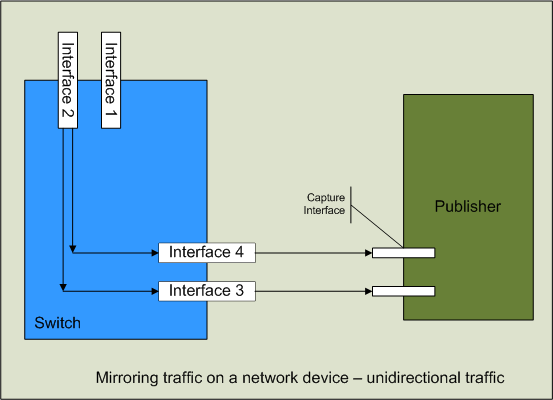
In the diagram above, two traffic sources have been created. One traffic source includes all of traffic received by Interface 2 (inbound traffic) , and the other traffic source contains all of the traffic transmitted from Interface 2 (outbound traffic). The inbound traffic is mirrored to Interface 3 which is physically connected to a capture interface on the Flow Publisher, and the outbound traffic is mirrored to Interface 4 which is connected to a different capture interface on the Flow Publisher. This configuration will ensure that there are no traffic bottlenecks created during peak traffic periods, as can be the case when mirroring bidirectional traffic.
Bidirectional mirroring
If you do not have the network interfaces available to accommodate the unidirectional configuration, or there is a bottleneck in the external link, you may choose to mirror all of the traffic (both inbound and outbound) in a traffic source to a single interface on the switch and connect that interface to a single capture interface on the Flow Publisher.
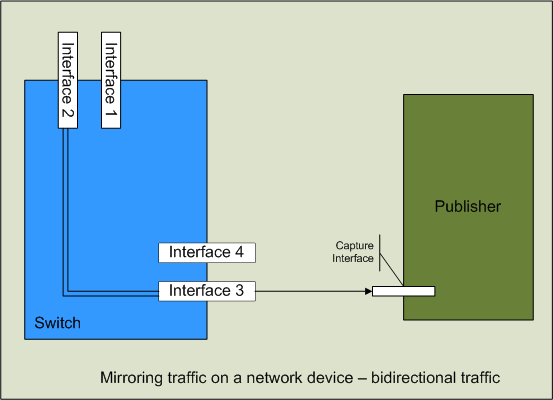
In the above figure, a single bidirectional traffic source has been created and mirrored to Interface 3. This traffic source contains all of the traffic received by and transmitted from Interface 2 combined. This combined bidirectional traffic is then sent to a single capture interface on the Flow Publisher.
Note: If Interface 2 and Interface 3 have the same bandwidth capacity and Interface 2 simultaneously exceeds 50% of its capacity in both inbound traffic and outbound traffic, Interface 3 may saturate and drop traffic that is in excess of its capacity.
If you choose to mirror bidirectional traffic (both inbound and outbound) to a single interface and forward that to a single capture interface on the Flow Publisher, additional MAC address interface mapping will need to be accomplished when configuring the Flow Publisher in order to determine the direction of the packets in the flow relative to the network or subnet from which the network traffic is being copied.
Example
This example shows how to mirror bidirectional traffic from an interface on a switch to the interface that sends traffic to the Flow Publisher. The router used in this example is a Cisco Cataylst 3560 switch. The traffic from the interface connected to the firewall, labeled gi0/1, will be mirrored to the interface connected to the Flow Publisher, labled gi0/6.
To mirror traffic on the Cisco Catalyst 3560 switch:
- Connect to the Cisco Catalyst 3560 switch using telnet or other connection protocol.
- Log in to the Cisco IOS as the device administrator.
- Enter the configuration mode on the switch.
config t - Create a monitoring session (1 – 66). The traffic source can be a single interface or vlan and the traffic direction can be tx = transmit, rx = receive, or both.
Monitor session 1 source interface gi0/1 both - Send mirrorred traffic to the interface that will send traffic to the Flow Publisher.(gigabit interface gi2/30).
Monitor session 1 destination interface gi0/6